


Kuroba: Manga Reader
0.00.00 Reviews
App Specs
- Version
- 1.0.3
- Updated On
- License
- Free
- Downloads
- 50,000+
- Developer
- TRANSPORT HOSPITAL GAME
- Categories
- Comics
- Platform
- Android
Screenshots

 Analysis by AppCompare
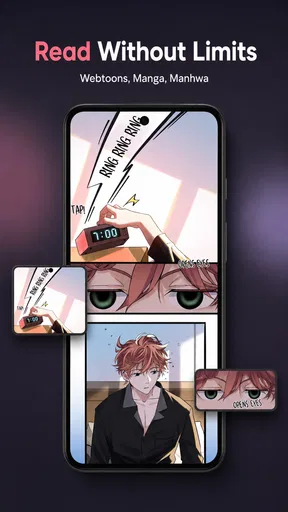
I like the idea of a comic reader that keeps the focus on the page rather than turning every reading session into a hunt through menus. Kuroba is a free comics app from TRANSPORT HOSPITAL GAME, built for readers who want to browse webtoons, manhwa, and manga on a phone. Its central appeal is a vertically scrolling reading experience, a format that feels natural for phone screens and works especially well for stories designed to unfold panel by panel.
There is a trust question worth considering before choosing any reading app: what controls does it actually give you, and what does it ask you to share? I can describe Kuroba’s purpose and basic availability, but I won’t treat unconfirmed privacy practices or account tools as established facts. If your decision depends on permissions, data handling, or account deletion, check the app’s current permission prompts and privacy information before signing in or granting access. Convenient reading is not a substitute for knowing what you are comfortable sharing.
Reading that suits a phone screen
I find it useful to judge a phone-first reader by how well it fits the small gaps in a day, not just by how it looks during a long session. Here, the continuous downward movement can make a few minutes with a comic feel easy to start and stop, while also making screen attention worth considering. That balance leads naturally to the question of how the reading flow changes the pace of a story.
Why vertical scrolling changes the pace
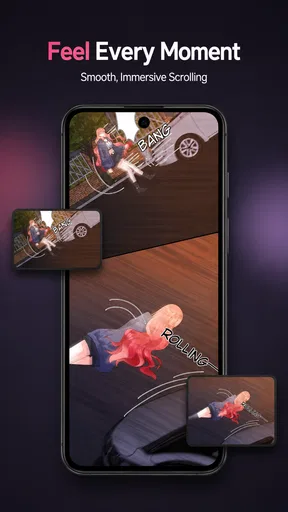
Traditional manga readers often present pages that you pinch, zoom, and turn. Kuroba’s vertical approach offers a different rhythm: you move down through the story, which can make a phone feel less like a shrunken book and more like a continuous reading surface. For webtoons and many manhwa, that layout is an especially comfortable fit because the panels are commonly arranged to be read in a downward flow.
In practical terms, this can make short reading breaks easier. I can imagine opening a chapter while waiting for a bus, reading a few screens, then putting the phone away without needing to manage a series of page turns. The trade-off is that a long vertical chapter may involve plenty of scrolling, and readers who prefer to see a complete manga page at once may find the format less satisfying. It is a design choice with a clear audience, not a universal improvement.
The app’s store summary names webtoons, manhwa, and manga, giving Kuroba a broader reading scope than a tool aimed at only one comic format. That breadth is useful if your reading habits move between styles. Still, the format label alone does not tell you how extensive the available catalog is, so I would treat it as a reader to explore rather than assume it has every series you already follow.
What to expect from the catalog experience
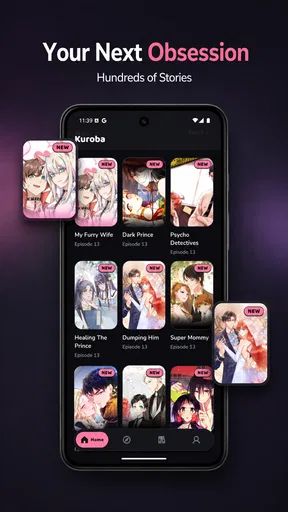
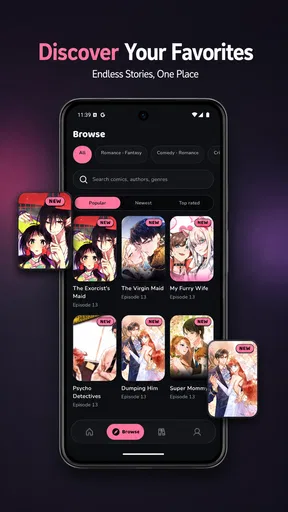
Kuroba is categorized as a comics app, and its short store description is simply its name. That makes the reading purpose clear but leaves the actual discovery experience to the app itself. When trying it, I would start with a specific title or genre I already enjoy, then see whether browsing makes it easy to find something new. That quick test is more useful than judging the app by its broad format coverage alone.
Worth Reading Before You Choose

EA SPORTS FC Mobile 26 Is a Bigger Football Game, but It Takes Time

Flipboard Shows What News Apps Must Do Beyond the Feed

Switching to Android Auto Means Rethinking Your Driving Routine

Google Calendar Makes a Crowded Week Easier to Manage

Ludo King Makes the Most of the Minutes Between Plans

Baby Panda World Brings Quick Play to Modern Phones, but Its Game Library Feels Busy
One useful habit is to sample a chapter in the conditions where you normally read. A bright commute, a quiet room, and a small phone screen can make the same artwork feel very different. Pay attention to whether text is comfortable at your usual brightness and whether the scroll pace feels manageable. If you routinely read on a tablet or prefer large two-page spreads, a page-oriented manga reader may suit you better.
The smooth-scroll emphasis points toward uninterrupted movement through a comic, but it should not be mistaken for a promise about every network or device situation. Images and reading flow can feel different depending on the connection and screen. If you plan to read away from reliable internet, check whether your chosen material remains available in the circumstances you need rather than building a routine around an assumption.
Trust is about choices, not impressions
Because a comics app can become part of a daily routine, I pay attention to the moments when it asks me to make a choice. A request for a permission should have a clear purpose that makes sense for what I am doing. If a prompt appears, I would read it before accepting, and I would avoid granting access that seems unrelated to reading unless the app explains why it is needed.
I also recommend separating “free to install” from “free of every possible trade-off.” Kuroba costs nothing to download, which lowers the barrier to trying it, but that alone does not establish how the app is funded or what data practices apply. I would look at the current privacy details and any in-app notices before entering personal information. That is sensible for any app, especially one you may use repeatedly.
If you prefer not to create an account, check whether the reading experience offers a meaningful way to proceed without one before committing time to a library or reading history. Likewise, if you do sign in, make a note of where account controls are presented and what options are available. I cannot assume those controls exist in a particular form; the practical advice is to inspect them directly and decide whether they meet your needs.
Small workflows that make the trial more useful
Rather than installing Kuroba and immediately moving over your entire reading routine, I would use a short trial. Choose one webtoon chapter and one manga chapter, if both are available to you, and compare how each looks and feels while scrolling. This reveals whether the reader’s approach works across the kinds of comics you actually enjoy, instead of relying on a general impression from the first few screens.
For a commute, I would first check how much attention the screen demands. Continuous scrolling can be convenient when you have a stable place to sit, but it is not ideal when you are walking or need to stay alert to your surroundings. A better use is a short wait or a seated ride: read a little, pause at a natural panel break, and resume when you have a safe moment. The format encourages flow, but your setting should decide how long you stay immersed.
A second useful check is to notice how you leave a chapter. If you tend to stop mid-story, see whether the app makes it straightforward to return to the same point. I would not assume a particular bookmark or history feature without seeing it, but this is exactly the kind of everyday detail that determines whether a reader becomes a habit or a one-time experiment. Test it before relying on the app for several ongoing series.
Finally, consider the cost of switching. If you already use another comic app, keep that setup for your regular titles while trying Kuroba with a new read. That lets you compare the actual scrolling comfort and discovery process without losing track of familiar routines. It also makes the decision clearer: keep it if the reading experience solves a real problem for you, rather than simply because it is another free app on your home screen.
Who will enjoy it, and who may prefer another reader
Kuroba is most promising for someone who reads on a phone, likes comics that flow vertically, and wants to try a free option spanning webtoons, manhwa, and manga. Its vertical comic reading is the defining reason to consider it. It may be particularly appealing if page controls feel fiddly on a small screen and you would rather follow a story by scrolling naturally.
I would be more cautious if you need specific account, privacy, or offline-reading controls to be confirmed before installing. In that case, compare the app’s visible settings and current privacy information with alternatives that clearly document the controls you need. The same goes for readers who depend on a particular library organization method or a particular catalog: verify those essentials first, because a general comics focus does not guarantee a specific feature or title.
Readers who prefer printed-page composition may also be happier with a conventional manga reader. Page layouts preserve the relationship between panels across a spread, while vertical scrolling can separate them into a tall sequence. Neither approach is inherently better. I would choose based on the art and reading habits I care about most, and keep a page-based alternative available for series whose panel composition matters to me.
Availability and a measured verdict
Kuroba is listed as free, has an Everyone content rating, and has reached over 50,000 installs. It was released on August 17, 2026, and the listed current version is 1.0.3, with Android 7.0 as the minimum operating-system requirement. Those details help set expectations for availability, but they do not tell me how well the app will fit a particular device or how its catalog will match an individual reader’s taste.
My recommendation is to approach Kuroba as a focused trial, not an automatic replacement for every comic app you use. Its phone-friendly scrolling makes sense for webtoons and manhwa, and the inclusion of manga gives curious readers more than one format to explore. The most useful test is simple: find a comic you genuinely want to read, try it in a typical setting, and check the choices the app presents before sharing information or settling into a routine.
If that reading flow feels comfortable and the app’s visible controls meet your expectations, it could earn a place in your rotation. If you need clearly documented data practices, particular account tools, or page-based reading, another option may be a better match. I’d give Kuroba a fair try for its scrolling-first approach, while making trust and control part of the decision rather than assuming they come along with a free download.
A practical first-session checklist
For a first session, I would keep the test deliberately small: open a title that interests me, read enough to judge the lettering and panel spacing, then stop and return later. That gives me a useful answer to a practical question: does the app make picking up where I left off feel natural? It also avoids spending time organizing a reading routine before I know whether the central experience suits me.
I would make that trial on the device I expect to use most, rather than deciding from a quick glance on a different screen. A phone is where vertical reading has its clearest advantage; on a larger display, page-based alternatives may make more sense depending on the comic’s composition. If you mainly read during brief breaks, the phone-first flow may be exactly what you want. If you settle in for long sessions and care about seeing panels together, compare the same kind of material in a page-oriented reader before choosing.
That comparison is also a good way to judge whether broad format coverage matters to you. Someone who alternates between manhwa and manga may appreciate having different comic styles under one reading app, while a reader devoted to a particular series may care more about whether that title is available and easy to follow. I would make catalog fit the deciding factor only after checking the titles I actually want, rather than assuming the format names guarantee a particular selection.
Where I would draw the line
I would skip Kuroba as my main reader if I needed dependable offline access, detailed library tools, or particular account safeguards before I could use it comfortably. Those are not small preferences when they shape how you read every day. I would choose an alternative that makes the relevant controls clear, then revisit Kuroba only if its visible options meet the same standard.
For a casual reader who simply wants to explore comics on a phone, the threshold can be different. A brief, low-commitment trial is reasonable as long as you review permission prompts, avoid sharing personal details unnecessarily, and do not assume that free installation answers questions about privacy or access. My cautious stance is not a reason to avoid the app outright; it is a reminder to make the decision based on what you can see and verify while using it.
In the end, Kuroba’s strongest case is specific rather than sweeping: it offers a scrolling-first way to read comics on mobile, with webtoons, manhwa, and manga as its intended territory. I would try it when that flow matches the way I read, keep a page-based option for work that benefits from complete spreads, and let the app’s actual catalog and visible choices determine whether it earns a regular place in my rotation.
Pros
- Clean reading interface keeps the focus on the manga.
- Multiple viewing modes suit different reading preferences.
- Library tools make it easier to organize saved titles.
- Reading progress helps you pick up where you left off.
- Useful browsing options help discover manga to read.
Cons
- Source availability can vary
- and some links may stop working.
- Catalog coverage depends on the sources configured in the app.
- Manga images may load slowly on weak connections.
- Some sources can show intrusive ads or redirects.
- Updates and interface details may differ between app versions.
FAQs for Kuroba: Manga Reader
What is Kuroba: Manga Reader?
Kuroba: Manga Reader is a manga-reading app designed to let users browse and read comics on a mobile device. Depending on the version and available sources, it may organize series into a library and provide tools such as reading-progress tracking, bookmarks, and display controls. Check the app’s current listing and in-app details before downloading, since its catalog, features, and supported sources can change over time.
Is Kuroba: Manga Reader free to use?
Whether Kuroba is free, includes optional purchases, or requires payment can depend on the version and platform. Review the app-store listing for current pricing and any in-app purchase information before installing. Also consider that access to manga may depend on the sources the app supports, and some sources can have their own restrictions or availability limits. Do not assume every title is free or accessible in every region.
How do I find and read manga in Kuroba?
After opening the app, look for its browsing, search, or source-selection options to find available series, then choose a chapter to begin reading. The exact navigation and catalog can vary by release. Reader settings may offer controls for page direction, layout, or other viewing preferences, but availability is not guaranteed. If a title or chapter is missing, check that the selected source is working and that the app is up to date.
Can I download manga for offline reading?
Offline reading depends on whether the installed version of Kuroba provides chapter downloads and whether the selected source permits them. Check the series or chapter menu for a download option and confirm that downloaded pages appear in the app’s library before going offline. Downloads can use substantial storage, and availability may differ between sources. Be mindful of mobile data use and follow applicable copyright rules when saving content.
Is Kuroba: Manga Reader safe, and what should I check before installing it?
For a safer download, use the official Apple App Store or Google Play listing when available, and verify the developer name, recent updates, permissions, and privacy information. Avoid unofficial installation files unless you understand the risks, since they may be modified or unsafe. If the app connects to external manga sources, their content and privacy practices may be separate from the app’s own. Availability and compatibility can also vary by device and region.


